
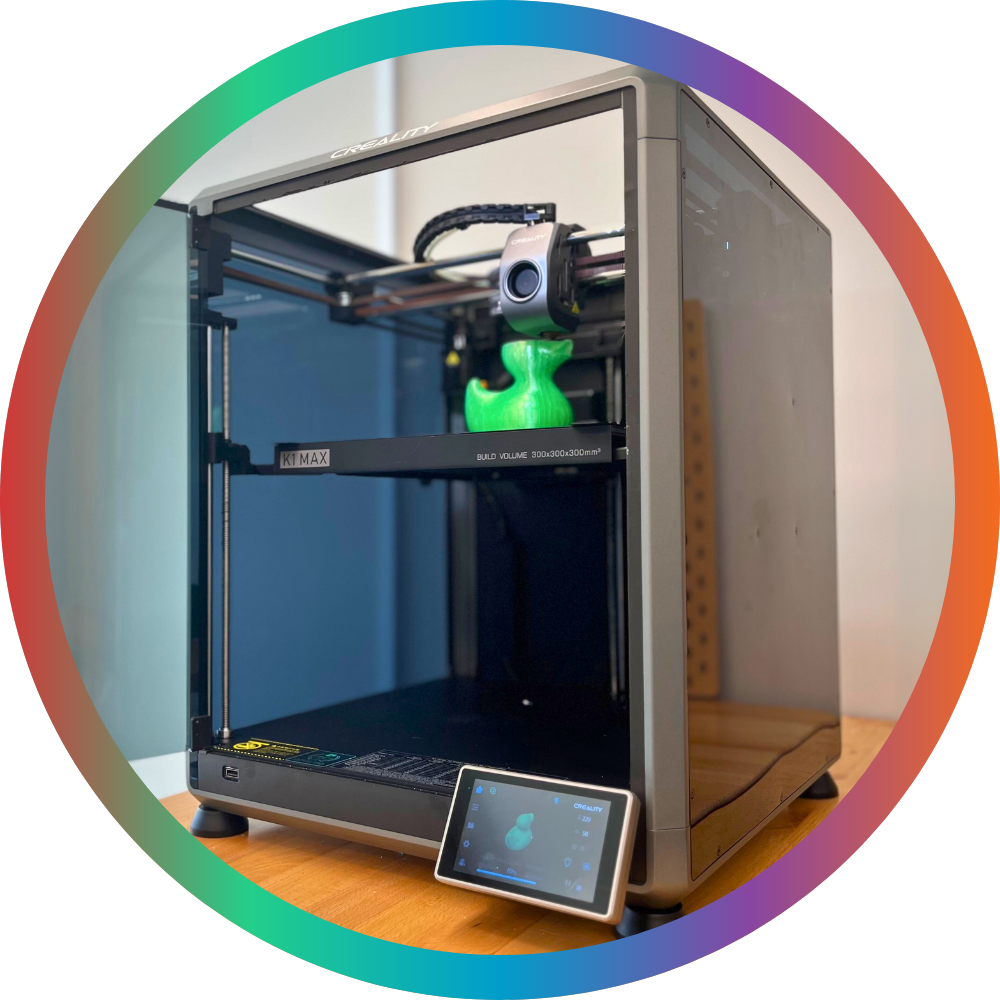
The Simcoe Branch has TWO (2) 3D printers:
- Creality Ender-3 S1 Plus
- Creality K1 Max
Select the correct printer when slicing your model for printing.
This website uses cookies to enhance usability and provide you with a more personal experience. By using this website, you agree to our use of cookies as explained in our Privacy Policy.
3D Printer
The Simcoe Branch has TWO (2) 3D printers:
Select the correct printer when slicing your model for printing.
Prepare your print in Creality Print.
You can download your 3D model in the MakerSpace and insert it to Creality Print to prepare your print on site.
Or, you can prepare it in Creality Print ahead of time from your own device and export the G-code with all your print settings configured.
Be sure to select the correct printer (Ender-3 S1 Plus or K1 Max) when slicing your print, in order to generate the proper g-code.
Prepared prints may be sent to the K1 Max directly from the computer or may be exported to a thumb drive.
Prepared prints for the Ender must be exported to an SD card.
PLA Filament is available in a variety of colours on a cost recovery basis. Visit the John Race MakerSpace to see what options are currently available.
ABS, Nylon, PETG, and TPU may also be used on the K1 Max only. The lid must be securely in place on the machine when these materials are in use. Staff assistance may be required to access the printer lid and these alternate materials. Please note that these materials may not print as reliably as PLA and it is the patron's responsibility to troubleshoot and configure their file for their chosen material.
For material prices, visit the MakerSpaces page.
Patrons can book time on the 3D printer computer to prepare and queue their prints.
Reserve Time on the 3D Printer Computer
3D prints can take many hours. Reserving the 3D printer computer does not guarantee that a 3D printer will also be available at that time.
If the printer you want to use is available, you can start printing it right away.
If it is not, you can send your prepared print to the printer and then queue it with staff. To queue your print, tell staff the name of the print job you sent to the printer (K1 Max) or saved to the SD card (Ender) and which filament you would like to print it with.
Either way, leave your contact details with staff at the circulation desk so we can contact you when your print is complete.
AccuQuilt
A GO! Big Electric Fabric Cutter and a hand-cranked GO! Fabric Cutter are both available for use with a collection of dies in the John Race MakerSpace.
| Shape | Cut Size | Finished Size |
| Apple Core | 6¾" height | 6½" height |
| Chisels | 3½" × 6½" | 3" × 6" |
| Circle | 1¼" | n/a |
| Circle | 1¾" | n/a |
| Circle | 2¼" | n/a |
| Circle | 2½" | n/a |
| Circle | 2" | n/a |
| Circle | 3" | n/a |
| Circle | 5" | n/a |
| Clamshell | 4½" | 4" |
| Clamshell | 8½" | 8" |
| Diamond | 4" sides | 3½" sides |
| Half Hexagon | 1" sides | ¾" sides |
| Half Hexagon | 1½"sides | 1¼" sides |
| Half Hexagon | 2½" sides | 2¼" sides |
| Hexagon | 1" sides | ¾" sides |
| Hexagon | 1 5/16" sides | 1" sides |
| Hexagon | 1½" sides | 1¼" sides |
| Hexagon | 2½" sides | 2¼" sides |
| Hexagon | 4½" sides | 4¼" sides |
| Letters A–Z | 3" height | n/a |
| Numbers 0–9 | 3" height | n/a |
| Parallelogram 45o | n/a | 3" × 4½" |
| Rectangle | 3½" × 6½" | 3" × 6" |
| Signature Block | 6½" | 6" |
| Strip | 1" width | ½" width |
| Strip | 1½" width | 1" width |
| Strip | 2" width | 1½" width |
| Strip | 2½" width | 2" width |
| Square | 1½" | 1" |
| Square | 2" | 1½" |
| Square | 2½" | 2" |
| Square | 3" | 2½" |
| Square | 3½" | 3" |
| Square | 4½" | 4" |
| Square | 5" | 4½" |
| Square | 6½" | 6" |
| Square | 8½" | 8" |
| Square | 10" | 9½" |
| Square on Point | 4¾" | 4¼" |
| Tumbler | 3½" | 3" |
| Triangle, Equilateral | 1" | ¾" |
| Triangle, Equilateral | 1½" | 1¼" |
| Triangle, Equilateral | 2½" | 2¼" |
| Triangle, Equilateral | 4½" | 4¼" |
| Triangle, Half-Square | n/a | 1" |
| Triangle, Half-Square | n/a | 2" |
| Triangle, Half-Square | n/a | 3" |
| Triangle, Half-Square | n/a | 4" |
| Triangle, Half-Square | n/a | 6" |
| Triangle, Half-Square | n/a | 8" |
| Triangle, Quarter-Square | n/a | 4" |
| Triangle, Quarter-Square | n/a | 6" |
| Block Name | Finished Block Size |
| Arkansas Traveler | 12" |
| Butterfly Pieced | 9" |
| Carpenter's Wheel | 18" |
| Cleopatra's Fan | 12" |
| Crossed Canoes | 9" (four 4½" units) |
| Double Wedding Ring | 12½" |
| Dresden Plates | 12" |
| Drunkard's Path | 6" (four 3" units) |
| Drunkard's Path | 7" (four 3½" units) |
| Drunkard's Path | 8" (four 4" units) |
| Flowering Snowball | 12" |
| Flying Geese | 3" × 6" |
| Grandmother's Fan | 9" |
| Hunter Star | 12" (four 6" units) |
| Joseph's Coat | 11" |
| Mariner's Compass | 12" |
| Morning Star | 12" |
| Rob Peter to Pay Paul | 7" |
| Schoolhouse Pieced | 9" |
| Winding Ways | 8" |
| Finished Block Size | Block Name |
| 6" | Flying Geese (3" × 6") |
| 6" | Drunkard's Path (four 3" units) |
| 7" | Drunkard's Path (four 3½" units) |
| 7" | Rob Peter to Pay Paul |
| 8" | Drunkard's Path (four 4" units) |
| 8" | Winding Ways |
| 9" | Butterfly Pieced |
| 9" | Crossed Canoes (four 4½" units) |
| 9" | Grandmother's Fan |
| 9" | Schoolhouse Pieced |
| 11" | Joseph's Coat |
| 12" | Arkansas Traveler |
| 12" | Cleopatra's Fan |
| 12" | Dresden Plates |
| 12" | Flowering Snowball |
| 12" | Hunter Star (four 6" units) |
| 12" | Mariner's Compass |
| 12" | Morning Star |
| 12½" | Double Wedding Ring |
| 18" | Carpenter's Wheel |
Button Maker
The Simcoe Branch has a 25mm button maker and a 58mm button maker.
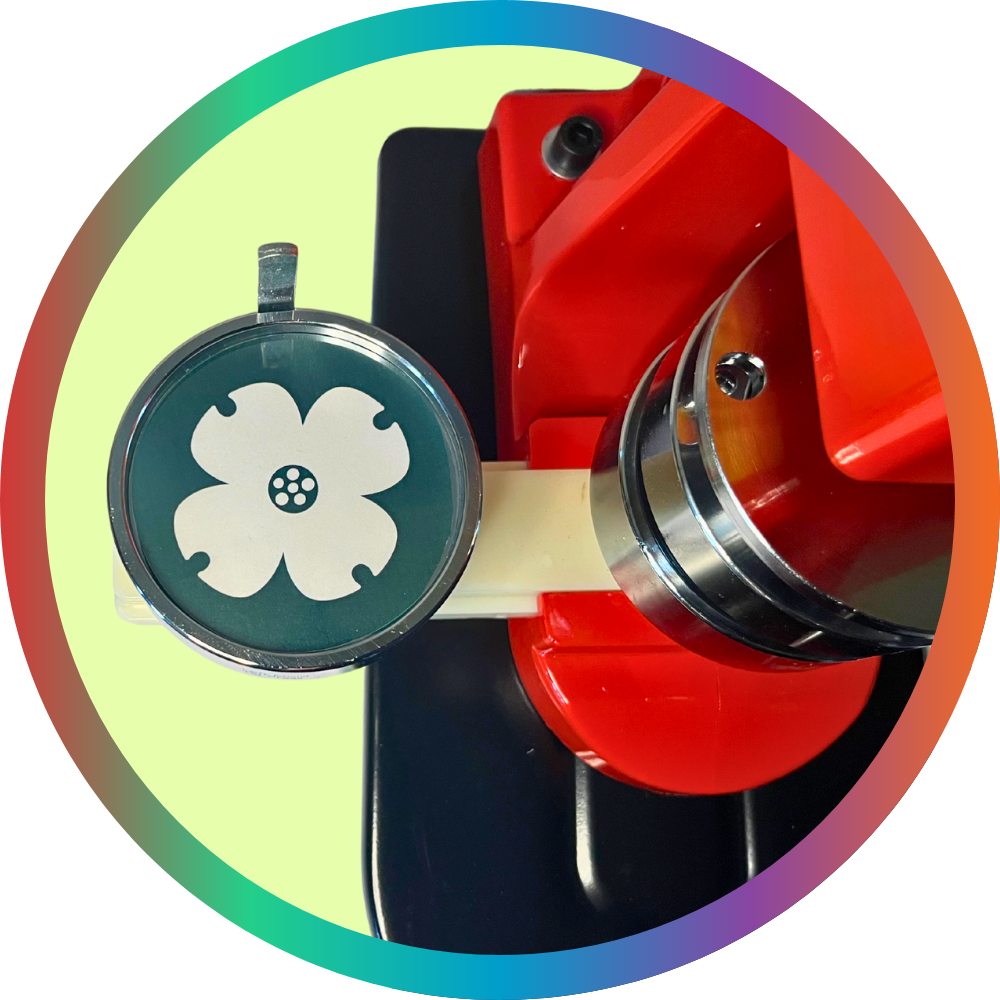
For a 58mm button:
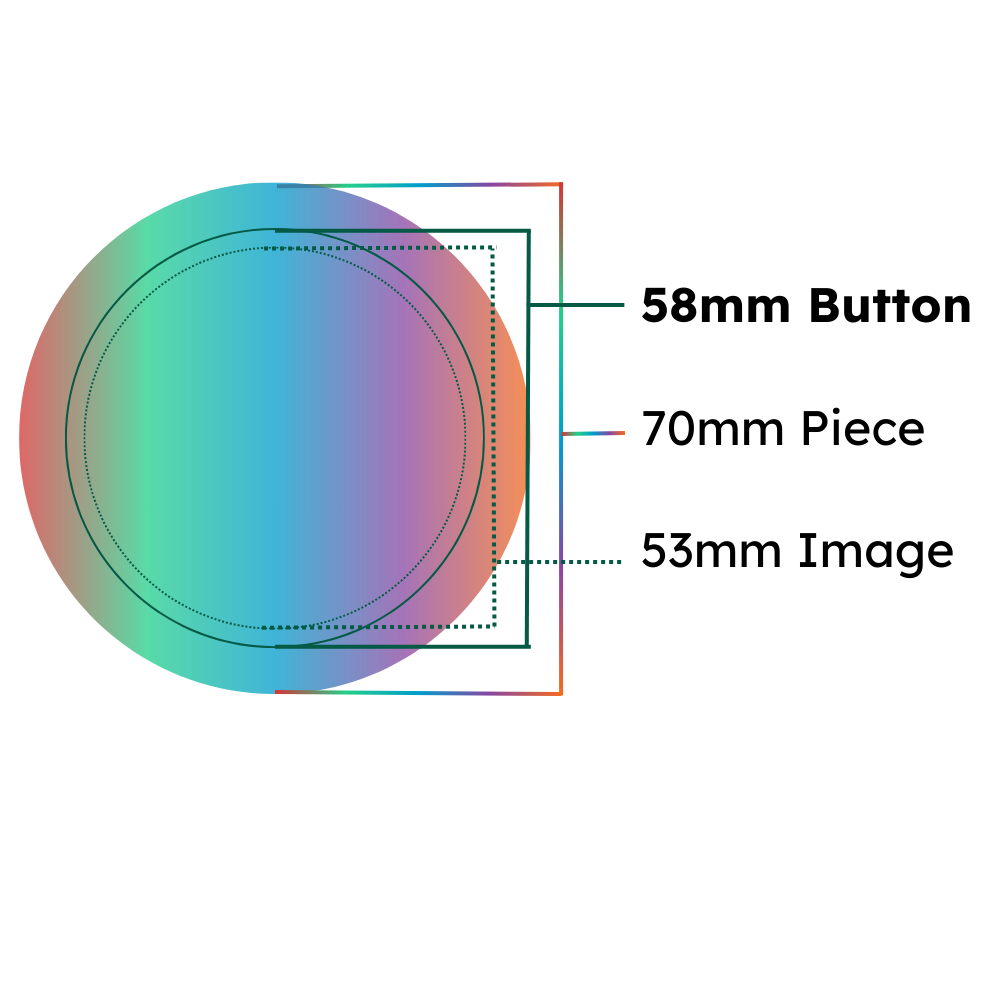
For materials and prices, see the MakerSpaces page.
Cricut
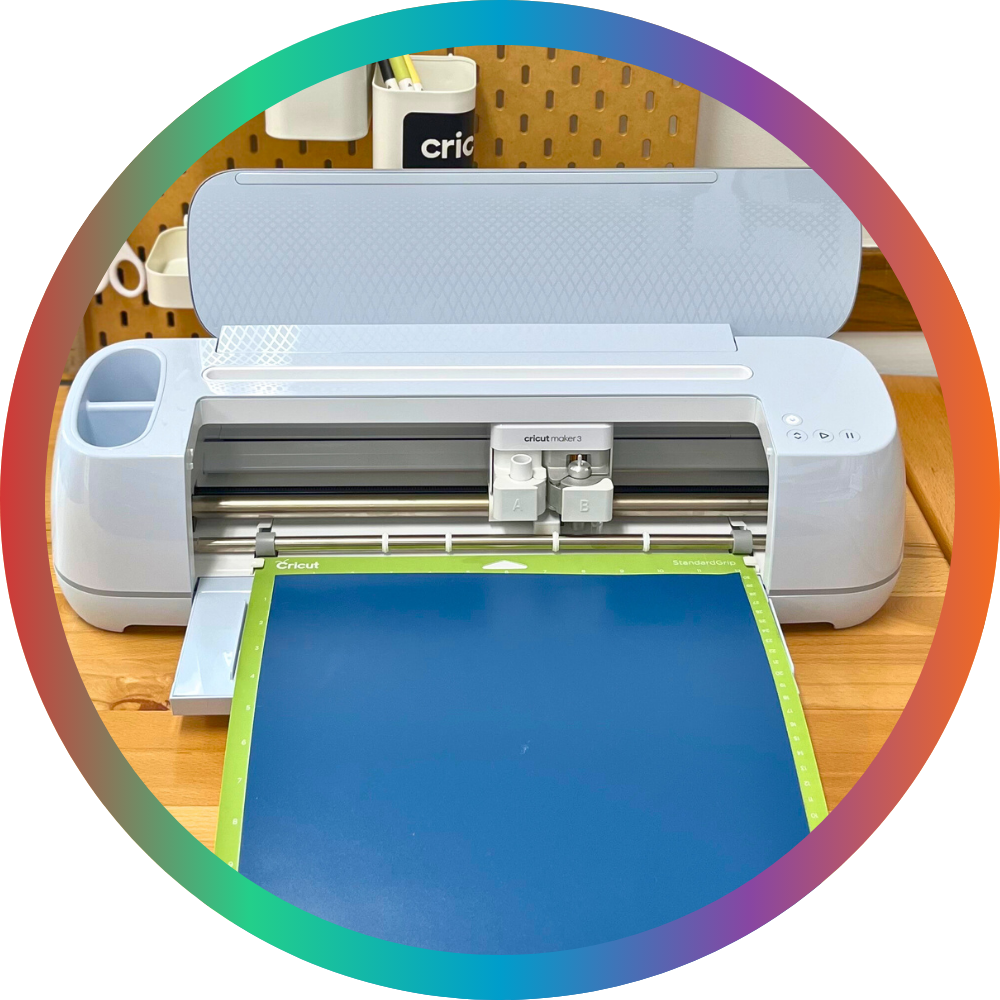
Each NCPL Branch has a Cricut Maker 3 available for patron use.
When preparing your project in Cricut Design Space, be sure your machine is set to Cricut Maker 3.
The Simcoe Branch has the following heat presses available for patron use:
The Autopress and EasyPress may be used to use to apply compatible materials to flat surfaces. Heat-transfer vinyl is provided in the MakerSpace on a cost-recover basis, or you may bring your own materials.
The hat press may be used to apply heat-transfer material to hats. Polyester or cotton hats will work with most heat-transfer vinyl. Only polyester hats can be used with infusible ink for full transfer. Always check the Cricut heat guide for both the heat-transfer material and the base material you are using together.
Heat-transfer vinyl is provided in the MakerSpace on a cost-recover basis, or you may bring your own materials.
The mug press must be used with a sublimation-compatible mug and infusible ink, either in the form of infusible ink transfer sheets or infusible ink drawings on paper.
Patrons must supply their own infusible ink. These supplies are available directly from Cricut or in a variety of craft supply stores.
The Library does keep a supply of sublimation-compatible mugs in the MakerSpace on a cost recovery basis. Patrons may also supply their own mug, as long as it is compatible as a "blank" for sublimation transfer. If the coating on the mug is not appropriate for sublimation transfer, the design will not transfer to the mug. Cricut produces a variety of "mug blanks" in different sizes and styles available for direct purchase, and these can sometimes be found in craft stores from Cricut and other suppliers, too.
Be sure to use the appropriate temperature and timing settings for the material you are using. Cricut provides a handy heat guide to determine the correct settings for your materials.
The following machine tools are available to use with the Cricut:
We make every effort to replace worn out or damaged machine tools without any disruptions to service.
If you believe a machine tool needs to be replaced while you are using the Cricut, please inform one of our helpful staff right away.
Many Cricut materials must be loaded on to the machine on an adhesive mat.
The following mat types and sizes are available to use with the Cricut Maker 3 in Delhi at no cost:
Patrons may also bring their own Cricut Smart materials which can be loaded into the machine without a mat.
You may also bring your own Cricut mats, including specialty mats, as long as they are compatible with the Maker 3.
Use the large format vinyl cutter to cut larger pieces of vinyl from 2-foot wide rolls.
Model: GCC AR-24
Software: GreatCut-S, Sure Cuts A Lot 6 for Windows
The vinyl cutter and Cricut are controlled from the same computer. To use either one, reserve the Cricut and Vinyl Cutter Computer.
For materials and prices, see the MakerSpaces page.
Sewing Machines
There are FOUR (4) sewing machines available for patron use in the John Race MakerSpace. Reserve one below!
These machines may be wheeled around or moved to a large table for use.
A limited supply of thread and pre-wound bobbins may be available.
Sewing machine maker kits are also available to borrow for use at home.
Reserve MakerSpace Access
You can reserve time in the MakerSpace right here!
Patrons may reserve time on any piece of equipment. You can also reserve access to the MakerSpace to use the space without using any of the reservable equipment.
Other patrons may be using the MakerSpace at the same time as you, whether using a different piece of equipment or using the space.
MakerSpace equipment or access must be reserved before it can be checked out, and it can only be checked out to the library card used to make the reservation.
To make a reservation, you must:
The patron who makes the reservation must be present at checkout, and is responsible for any guests they bring with them. Children may only use the MakerSpace when they are accompanied by an adult, and that adult must have a reservation with their library card.
The full MakerSpace terms of use will be presented as part of the reservation process. These terms must be accepted before the reservation can be completed.
Contact Us
Norfolk County Public Library
46 Colborne St. S.
Simcoe, Ontario N3Y 4H3
Phone: 519-426-3506
Fax: 519-426-0657
Locations and Hours